Advanced colorramps in NetLogo
Welcome
Welcome everybody to my fresh webpage. Every now and then I’ll post short little code exercises that I think might be helpful for people out there. Most of this will be related to NetLogo and R and the combination of both tools.
In this first post, I will demonstrate how you can use R colorramps, such as the wonderful viridis colorramp, directly in your NetLogo models.
Colorramps
The R package Viridis provides color palettes that are optimized to represent data. The colorramps are easier to read by those with colorblindness and can be easily distinguished when printed in grey scale.
I use viridis colorramps for many data visualization purposes every day. However, I also work quite a lot with NetLogo models and was always missing the possibilty to use nice color palettes for coloring the cells or turtles according to certain properties of these agents.
The palette extension, which comes as a bundled extension with NetLogo actually provides primitives for scaling RGB color lists to agent variables. There is also a function to access the RColorBrewer palettes. However, the extension does not support custom palettes directly. Thus, I created a short code snippet in R that allows you to export any color palette. You can then use these color palettes directly in NetLogo.
Extract color values from the viridis palettes
In order to implement the viridis colorramp into NetLogo, we first need to extract the RGB color values from the viridis palette. In the following code snippet, we use the colormap package to create a palette with RGB values. Afterwards, we write the palette values to a *.txt file in a “NetLogo-friendly” format.
library(viridis)
library(colormap)
# Define length of palette. n > 300 doubles some colors
n <- 300
# Create a palette rgb dataframe
virpal <- colormap(colormap = colormaps$viridis, format = 'rgb', nshades = n)
# Remove alpha channel
virpal <- virpal[,-4]

# Write as file
sink("palette.txt")
cat("[")
for (i in 1:nrow(virpal))
{
  cat("[")
  cat(paste0(virpal[i,]))
  cat("]")
}
cat("]")
sink()
The colormap package supports many different colorramps, including additional viridis palettes, such as the magma or plasma palette. A complete list can be found here. In order to create output files for these colorramps, you only need to adjust the colormaps$viridis parameter within the colormap function call. For example, colormap(colormap = colormaps$magma, format = 'rgb', nshades = n) will report n values of the magma palette.
Implementing the colorramp in NetLogo
First, we need a function that reports the complete colorramp of our palette. We can use a NetLogo reporter function to achieve this. I created a new reporter function and copy-pasted the values from the written palette.txt file into this function.
Thus, when this function is called it will report the complete list of colors from our exported palette.
to-report pal.viridis
  report [[68 1 84][68 2 85][68 3 86][68 4 87][68 6 88][68 7 89][68 8 90][69 9 91][69 10 92][69 11 93][69 12 94][69 13 95][69 15 96][69 16 97][69 17 98][69 18 99][69 19 100][69 20 101][69 21 102][70 23 103][70 24 104][70 25 105][70 26 106][70 27 107][70 28 108][70 29 109][70 30 110][70 32 111][70 33 112][70 34 113][70 35 114][70 36 115][71 37 116][71 38 117][71 39 118][71 41 119][71 42 120][71 43 121][71 44 122][71 44 122][71 45 122][70 46 123][70 47 123][70 48 124][69 49 124][69 50 125][69 51 125][68 52 126][68 54 126][68 55 127][67 56 127][67 57 128][67 58 128][66 59 129][66 60 129][66 61 130][65 62 130][65 63 131][64 64 131][64 65 132][64 66 132][63 67 133][63 68 133][63 69 134][62 70 134][62 71 135][62 73 135][61 74 136][61 75 136][61 76 137][60 77 137][60 78 138][60 79 138][59 80 139][59 81 139][59 81 139][59 82 139][58 83 139][58 84 139][57 84 139][57 85 139][57 86 139][56 87 140][56 88 140][55 89 140][55 89 140][55 90 140][54 91 140][54 92 140][53 93 140][53 94 140][53 94 140][52 95 140][52 96 140][52 97 141][51 98 141][51 99 141][50 100 141][50 100 141][50 101 141][49 102 141][49 103 141][48 104 141][48 105 141][48 105 141][47 106 141][47 107 141][46 108 142][46 109 142][46 110 142][45 110 142][45 111 142][44 112 142][44 113 142][44 113 142][44 114 142][43 115 142][43 116 142][43 117 142][42 117 142][42 118 142][42 119 142][41 120 142][41 121 142][41 122 142][41 123 142][40 124 142][40 125 142][40 125 142][39 126 142][39 127 142][39 128 142][38 129 141][38 130 141][38 131 141][37 132 141][37 132 141][37 133 141][36 134 141][36 135 141][36 136 141][36 137 141][35 138 141][35 139 141][35 140 141][34 140 141][34 141 141][34 142 141][33 143 141][33 144 141][33 144 141][33 145 141][33 146 140][33 146 140][34 147 140][34 148 139][34 149 139][34 149 139][34 150 138][34 151 138][35 152 138][35 152 138][35 153 137][35 154 137][35 155 137][35 155 136][36 156 136][36 157 136][36 158 135][36 159 135][36 159 135][36 160 134][36 161 134][37 162 134][37 162 133][37 163 133][37 164 133][37 165 132][37 165 132][38 166 132][38 167 132][38 168 131][38 168 131][38 169 131][38 170 130][39 171 130][39 171 130][39 172 129][39 173 129][39 173 129][41 174 128][42 175 127][44 175 126][45 176 126][47 177 125][48 178 124][50 178 123][51 179 122][53 180 121][54 181 120][56 181 120][57 182 119][59 183 118][60 184 117][62 185 116][63 185 115][65 186 114][66 187 114][68 188 113][69 188 112][71 189 111][72 190 110][74 191 109][75 192 108][77 192 108][78 193 107][80 194 106][81 195 105][83 195 104][84 196 103][86 197 102][87 198 102][89 198 101][90 199 100][92 200 99][92 200 99][94 201 98][96 201 96][98 202 95][100 202 94][102 203 93][104 203 91][106 204 90][108 204 89][110 205 87][113 205 86][115 206 85][117 206 84][119 207 82][121 207 81][123 208 80][125 208 78][127 209 77][129 209 76][131 210 75][133 211 73][135 211 72][137 212 71][139 212 69][141 213 68][143 213 67][145 214 65][147 214 64][149 215 63][152 215 62][154 216 60][156 216 59][158 217 58][160 217 56][162 218 55][164 218 54][166 219 53][168 219 51][170 220 50][170 220 50][172 220 50][175 221 49][177 221 49][179 221 49][182 222 48][184 222 48][187 222 47][189 223 47][191 223 47][194 223 46][196 223 46][198 224 46][201 224 45][203 224 45][206 225 44][208 225 44][210 225 44][213 226 43][215 226 43][217 226 43][220 227 42][222 227 42][225 227 41][227 228 41][229 228 41][232 228 40][234 228 40][236 229 40][239 229 39][241 229 39][244 230 38][246 230 38][248 230 38][251 231 37][253 231 37]]
end
This reporter function can now be stored as a separate *.nls file. This file can then be included in any NetLogo model via the __includes[] primitive.
Of course you can add multiple reporters for different palettes into this file. In the NetLogo example at the end of this post, I implemented four different palettes.
How to use the palettes
Of course, we need a function that scales our color palette to the variable values of agents.
We can use the color scaling function from the palette extension to achieve this.
The palette:scale-gradient function works similar to the scale-color primitive of NetLogo. It takes 4 arguments: rgb-color-list number range1 range2.
The first argument is a list of RGB color values, such as the list we created with our palette reporter.
The function will further take the variable value of the current agent (number). The remaining two values (range1, range2) define the variable range. The function will then scale the variable range onto the range of the selected color palette and selects the item that corresponds to the variable value of the actual agent. Similar to the scale-color primitive, you can revert the direction of the colorramp by switching the range1 and range2 values.
Using the palette:scale-gradient functions works very similar to the scale-color primitive. First you need to load the palette extension in your model (extensions[palette]). Assuming our turtles have a turtles-own variable t_x, we can use this variable to color the turtles according to these values. We first store the extremes of our variable distribution as local variables. We then ask all turtles to set their color, using the palette:scale-gradient function. As function arguments we provide the name of the reporter for the palette of our choice, the name of the turtle variable and the corresponding extreme values.
;; Store extremevalues:
let xmin min [t_x] of turtles
let xmax max [t_x] of turtles

;; Set colors
ask turtles [set color palette:scale-gradient pal.viridis t_x xmin xmax]
Of course, we can do the same for patches:
;; Store extremevalues:
let xmin min [p_x] of patches
let xmax max [p_x] of patches

;; Set pcolors
ask patches [set pcolor palette:scale-gradient pal.viridis p_x xmin xmax]
As explained above, if you want to revert the colorramp, you can just switch the xmin and xmax values:
ask patches [set pcolor palette:scale-gradient pal.viridis p_x xmax xmin]Of course, we can also use one specific color from a palette. For example, if we want to color one random patch with the 42nd color of the viridis palette:
ask one-of patches [set pcolor item 42 pal.viridis]Complete NetLogo example including four palettes
Download a NetLogo example model here: colormap.nlogo; colormap.nls
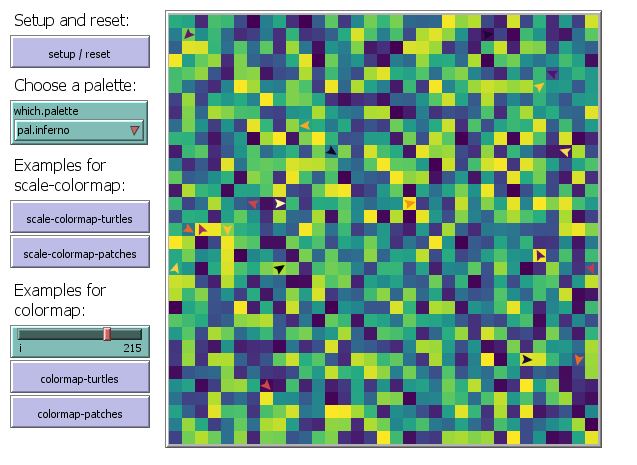
The colormap.nls file contains reporters of four color palettes (viridis, magma, plasma, inferno) and can be included to any NetLogo model. The colormap.nlogo model shows some examples of these color reporters in action. Please download both files, put them in the same folder and open the colormap.nlogo file to run the examples (NetLogo 6.1.0, but should work with older versions as well). Of course you can edit the colormap.nls file and add more palette reporters of any palettes you wish to use.
Have fun coloring your agents, prettier than ever before and stay tuned for more NetLogo and R related content ;)